
Team workflow
How to Create LinkedIn Content as a Team: A Practical 2026 Guide
How to gather ideas, collaborate on drafts, and review posts together without polishing away the voice of the person who lived the experience.
The strongest team LinkedIn content doesn't sound like it came from one person. Learning how to create LinkedIn content as a team means sharing the work, not standardizing everyone's voice. Your colleagues already have useful experience to share. The challenge is turning it into clear posts without letting review rounds polish away the perspective that made each idea worth sharing.
A good process doesn't require everyone to become a confident writer or follow the same formula. It makes it easier to spot useful moments from the work, shape them into posts, and let contributors sound like themselves. Company messaging can provide direction, but it shouldn't crowd out the person behind each post.
This guide shows how to gather ideas, collaborate on drafts, and review content without adding unnecessary steps. You'll learn how to turn real work experience into post ideas, assign clear roles, and keep each post useful and recognizably human. A shared workspace such as LinkedTeams can help colleagues develop organic posts while contributors retain ownership of their voices.
Key takeaways
- Turn specific work moments, customer questions, and recurring challenges into post ideas.
- Match each idea to a fitting format: a personal perspective, a practical lesson, or a company-page update.
- Use a five-step process to capture ideas, select a topic, draft, review, and publish with clear roles.
- Keep posts grounded in a contributor's experience, and review for clarity without polishing away their voice.
- Use a shared workspace when contributors need one place to shape organic LinkedIn posts from internal expertise.
Why creating LinkedIn content as a team often feels harder than it should
Your team knows the work, but useful knowledge doesn't automatically become a clear post. One colleague has a sharp observation from a project. Another knows the questions customers keep asking. Without a shared way to collect and shape those insights, they can stay buried in meetings, chats, and private notes. Learning how to create LinkedIn content as a team starts with treating everyday experience as the raw material, rather than expecting polished copy to appear on demand.
LinkedIn is a professional networking platform where people and organizations share ideas and updates. A company-page post might announce a hiring round or explain a business update, while a team member's post can show what they learned from doing the work. These formats can support each other, but they aren't interchangeable. A company message gives context; a person's perspective gives it a specific point of view. For a basic overview of the platform, see LinkedIn on Wikipedia.
What counts as team-created LinkedIn content?
Team-created content is developed with input from colleagues and published in an individual contributor's voice. The author might share a real moment, such as noticing that a handoff between departments repeatedly causes confusion. A teammate can add an example, clarify a technical detail, or help make the takeaway easier to follow. Their input strengthens the post without making them its author.
That's collaboration with clear ownership. The contributor brings the experience and decides what they stand behind. Colleagues can ask useful questions or suggest edits, but they don't need to replace the author's language with a uniform company script. Not every employee needs to publish, either. Some people may offer expertise or examples behind the scenes, while others choose to write and share posts themselves.
Why do team posts become generic or stall?
Drafts often stall because nobody knows who owns the next move. One person assumes a manager will approve the post, while the manager expects the author to make another edit. Name one owner who is responsible for moving the post forward, then make everyone else's role clear: contribute an example, check a detail, or review for clarity.
Too many reviewers can create a different problem. Each person adjusts a phrase, adds a broad message, or removes a detail that feels too narrow. The post may become smoother, but its original point gets harder to see. Review should protect accuracy and improve understanding, not make every contributor sound alike. The same loss of specific detail is why AI-generated posts often sound generic.
Start with what someone actually noticed. "Customers often ask the same question before onboarding" gives a writer something concrete to explore. "We're committed to customer success" is a company talking point, not yet a useful post.
Share the process, but leave the experience and point of view with its contributor. That balance gives a team structure without turning individual posts into anonymous company copy.
Turn real team expertise into a clear LinkedIn post
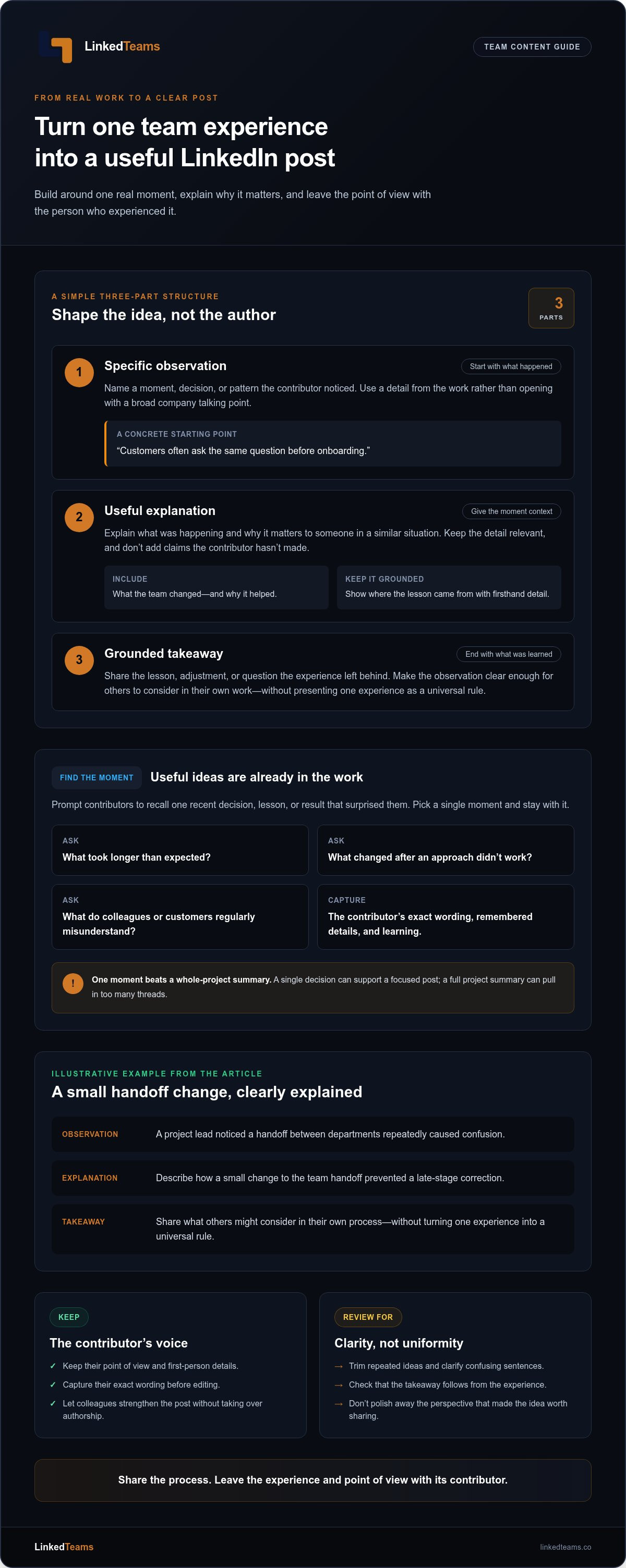
A useful post doesn't need to cover an entire project or prove how much the author knows. It needs one clear point grounded in something they've seen or done. A simple structure can help the writer shape that point without losing the details that make it theirs:
- Specific observation: Name a moment, decision, or pattern the contributor noticed.
- Useful explanation: Explain what was happening and why it matters to someone in a similar situation.
- Grounded takeaway: Share the lesson, adjustment, or question the experience left behind.
For example, a project lead might describe how a small change to a team handoff prevented a late-stage correction. The post can explain what the team changed, why it helped, and what others might consider in their own process. The point isn't to turn one experience into a universal rule. It's to make a practical observation clear enough for others to apply.
Find a post idea in everyday work
Ask contributors to recall a recent decision, lesson, or result that surprised them. What took longer than expected? What did the team change after an approach didn't work? Which part of the process do colleagues or customers regularly misunderstand? These prompts often uncover stronger material than asking someone to "think of a post." Choose one moment and stay with it. A single decision can support a focused post; a whole project summary usually pulls in too many threads.
Capture the contributor's exact wording before editing. Note the phrase they used to describe the problem, the detail they remember, and what they learned. Their first explanation may be rough, but it often holds the sharpest insight. Editing can tighten the draft later. Starting with their language gives the author a real voice to refine, rather than a blank page filled with someone else's assumptions.
Firsthand detail also gives readers a reason to trust the point. A specific description shows where the lesson came from. Broad claims ask readers to take the author's word for it; an honest account lets them see the experience behind the advice. Keep the detail relevant, and don't add claims the contributor hasn't made.
Shape the draft without taking over the author's voice
Keep the writer's point of view and first-person details in place. Trim repeated ideas, clarify confusing sentences, and check that the takeaway follows from the experience. Don't replace a contributor's plainspoken phrasing with polished company language just because it sounds more formal. The post should read clearly and still sound like its author.
Close with a useful reflection or a genuine question that invites readers to consider the idea. Avoid adding a promotional pitch that doesn't belong. This is a practical starting point for how to create LinkedIn content as a team: shape the insight together, then leave the author in charge of what it means. A shared LinkedIn content workspace can give contributors one place to develop posts while keeping ownership with the writer.
Choose a LinkedIn post approach that fits the idea and its author
Once an idea is clear, decide whose perspective should carry it. A personal perspective, a practical lesson, and a company-page update can all support the same broad theme, but they serve different purposes. Choose the format based on what the post needs to say and who can speak to it directly. That choice keeps team content from sounding like an official announcement every time.
| Approach | Best suited to | Post owner |
|---|---|---|
| Personal perspective | An opinion or observation shaped by one person's role or experience | The contributor whose perspective it reflects |
| Practical lesson | A useful method or insight drawn from work | The person closest to the example or lesson |
| Company-page update | An announcement or message representing the organization | The team responsible for the official update |
When should a team member publish from personal experience?
Use an individual post when its value depends on what one person noticed, decided, or learned. A designer might explain why a particular customer request changed how they approach a project. A manager might share a perspective on a difficult trade-off. The post belongs to the contributor whose experience gives it meaning, and they should have the final say on whether it represents their view accurately.
Keep the boundary clear. A team member can describe what they learned without presenting that opinion as company policy. If the topic includes an official position or commitment, separate that statement from the contributor's personal analysis. Readers should be able to tell whose view they're hearing.
When does a LinkedIn Page update fit better?
Use the company page when the information speaks for the organization as a whole. An official announcement, company milestone, or broad business update is usually better suited to the page than to an employee's personal profile. Keep the wording factual and aligned with what the organization intends to communicate.
Coordination doesn't mean duplication. If a company page shares an update, a team member can add a distinct perspective, such as what they worked on or what the change means in their role. They shouldn't simply paste the announcement and present it as personal commentary. The shared theme can stay consistent while each contributor chooses a relevant detail, point of view, or lesson of their own. Use the page for the official message and an individual voice for the lived experience around it. This is the same line that separates employee advocacy from employee thought leadership.
Create a team LinkedIn post with a simple five-step process
A clear workflow keeps a good idea moving without turning it into a committee project. Give every post one owner, then define what each collaborator is contributing. The owner keeps the draft moving and makes sure the final version still reflects the person who will publish it.
Capture the idea, select one useful point, draft in the author's voice, review for accuracy and clarity, then let the author publish. Put that process into practice with these five steps:
- Capture. Record a short account of the event, decision, lesson, or question behind the idea. Note who experienced it and what they noticed. A few direct phrases from the contributor are more useful than a polished summary written by someone else.
- Select. Choose one point the intended LinkedIn audience can understand and use. A detailed project may contain several lessons, but a single post should have one main thread. Before drafting, remove confidential details and set aside claims the contributor can't support.
- Draft. Let the post owner shape the first version in their own words. A collaborator can help organize the ideas or ask what a reader needs explained, but the draft should keep the owner's perspective. The goal is a clear post, not a shared voice with no identifiable author.
- Review. Ask reviewers to check factual accuracy, clarity, and alignment with the intended message. Encourage them to flag a confusing passage or a detail that needs correction. Don't use review as an invitation to rewrite for personal style preferences.
- Publish. The author reads the final version and decides whether it represents them. If it does, they publish it from their account. If it doesn't, revise the point or wording before it goes live. Clear ownership makes the final decision straightforward.
Capture and select the strongest idea
Keep the captured note brief. It might say, "We changed the review handoff after the same detail was missed twice," followed by what the contributor learned. That's enough to start shaping an idea without documenting the whole project. Select the part that would make sense to someone outside the team, and leave out sensitive specifics or conclusions that go beyond the experience.
Draft, review, and publish with clear ownership
Decide at the start who owns the post and what each collaborator is there to do. One colleague might confirm a technical detail; another might flag a sentence that needs context. Neither role requires taking over the author's voice. This makes the process easier to repeat: contributors know where to add value, while the author keeps control of the perspective and final wording.
For a shared place to develop organic posts from internal expertise, see how drafting and publishing work in LinkedTeams.
Make team LinkedIn content easier to create with a shared workspace
A shared workspace becomes useful when several contributors need one place to shape posts. Without it, ideas and edits can end up scattered across chats, documents, and inboxes. That creates extra work to find the latest version or understand who should respond. A common space gives contributors a place to bring expertise together while keeping the post's owner and purpose visible.
Strong team content starts with what people know from doing the work. A subject matter expert can supply a useful detail. A colleague can clarify the context. The author can then shape those contributions into a post that reflects their own experience and voice. Collaboration should support the author, not replace them.
What a collaborative workspace contributes
LinkedTeams is collaborative software for B2B teams creating organic LinkedIn posts from internal expertise. Its shared workspace supports team collaboration and company voice alignment while allowing individual creators to retain their voices. Colleagues can contribute knowledge and genuine professional experiences without treating every draft as company copy. The contributor remains responsible for the perspective and final post.
Software doesn't supply the insight. The people closest to the work do. A shared workspace can help bring their input into the drafting process, making it easier to develop a useful observation with colleagues instead of losing it in separate conversations. Keep the roles clear: contributors offer experience or context, and the post owner decides how that material fits their point.
Start with one useful post, then repeat what works
There's no need to roll out a complicated process across the whole team at once. Choose one willing contributor and one specific work experience. Give the post a clear owner, gather the relevant detail, and use the five-step process from the previous section: capture, select, draft, review, and publish. Once the post is finished, note what made the collaboration straightforward and what caused friction.
Use that experience to refine your approach. Perhaps the contributor needed more time to explain the example, or reviewers needed clearer guidance about what feedback to give. Adjust the collaboration, not the contributor's personality. The aim is a repeatable way to help people share useful expertise without making each post sound alike. For more on getting a first group started, see how to get your B2B team to post on LinkedIn without making it another job.
If scattered drafts make collaboration harder, a common workspace can bring the work together. See how the LinkedTeams workspace works for organic LinkedIn post creation that lets contributors keep ownership of their voices. Start with a single post and build from what you learn.
Start with one contributor and build from there
The next step doesn't need to be a full content program. Choose one willing colleague and one real work experience. Agree on who owns the post, what kind of input would help, and what the contributor wants readers to take away. Treat the first attempt as a chance to learn, not a test of whether your team has a perfect process.
That small start can show you what makes collaboration feel natural. Notice where the contributor needs support and where reviewers can step back. Then carry those lessons into the next post. That's a practical way to make team LinkedIn content part of regular work while keeping each person's perspective their own.
Start with the knowledge already in your team. Try the free LinkedTeams demo to see how B2B teams can create organic LinkedIn content together while keeping individual voices intact.
One useful post is enough to begin.
Frequently asked questions
How many people should be involved in creating one LinkedIn post?
Keep the working group small enough that one person can clearly own the post. The author supplies the experience and remains responsible for the final version. One colleague or editor can help clarify the point or check a technical detail. Add another reviewer only when they have specific knowledge the draft needs. For example, ask a product specialist to verify a feature, not to weigh in on every wording choice.
Should every employee post on LinkedIn for the company?
No. A useful team approach invites willing colleagues to share expertise, but it doesn't make posting a requirement for everyone. Someone who prefers not to publish can still contribute an example or answer a subject matter question. Let each person decide whether an idea belongs on their profile. That keeps participation grounded in genuine knowledge rather than turning a personal account into a compulsory company channel.
Can employees use their own voice while following company messaging?
Yes. Set shared boundaries around facts, sensitive topics, and the themes the organization wants to communicate, then let each author express the idea naturally. Several colleagues can discuss the same industry change from the perspective of their own roles, for example. Reviewers should flag inaccurate details or confusing claims, not replace different writing styles with one approved script.
What happens if a draft includes confidential company or customer information?
Pause the draft and remove or generalize details that shouldn't be public. Check names, project specifics, customer situations, and internal decisions, not just the main point. A team member might describe a recurring customer challenge without identifying the customer or sharing private circumstances. If removing a detail makes the story misleading or strips away its useful lesson, choose a different example instead.
How often should a team publish LinkedIn content?
Choose a pace contributors can maintain without rushing or inventing topics. Start with a manageable commitment based on who is willing to write and how much time they can give it. After publishing, consider whether the post prompted relevant questions and whether the effort felt reasonable. Increase the pace only if the team can keep the work accurate and worthwhile.
How can a team tell whether its LinkedIn content is useful?
Look for signs that the post prompted the right kind of conversation, such as a thoughtful question from a peer or a response that adds a relevant example. Raw reactions alone don't show whether the idea helped anyone. Ask the author whether the post represented their experience accurately, too. Use these observations to improve future topics and drafts, not as a promise of reach or business results.
Can a team create LinkedIn content without a dedicated content marketer?
Yes. A dedicated marketer isn't required for a team to share a useful work insight. One colleague can own the idea while another offers targeted input, such as checking terminology or adding context. Start with a focused draft and a clear division of roles. LinkedTeams provides a collaborative workspace for organic B2B LinkedIn posts.