
Choosing a tool
B2B LinkedIn Content Software: A Practical Guide for Teams
What team-focused content software can and can't do, how it differs from automation and scheduling tools, and how to tell whether your team is ready for one.
What if the answer to scattered LinkedIn expertise isn't more automation, but a clearer way for colleagues to work together? B2B LinkedIn content software can help teams turn lessons from projects and customer work into organic posts. The useful kind gives people structure without making their content sound scripted or taking authorship away from them.
If writing and posting feel like extra jobs, you're not alone. Generic templates can flatten individual perspectives, while automated posting can put consistency ahead of credibility. Team-focused software has a different role: it helps colleagues develop ideas and coordinate content while leaving the voice and judgment with each person.
This guide explains what the software can and can't do, how a collaborative content workspace differs from automation tools, and how to assess the fit for your team. You'll also see how LinkedTeams helps B2B teams develop organic LinkedIn posts from internal expertise while keeping each creator's voice intact. The goal isn't to manufacture a company voice. It's to make real expertise easier to share.
Key takeaways
- Trace your content bottleneck from idea to review to see where team expertise gets stuck.
- B2B LinkedIn content software can help colleagues shape work experience into clear posts while keeping each author's voice intact.
- Separate content collaboration, publishing, and sales outreach by the job each tool is meant to support.
- Before choosing a workspace, assign clear owners for ideas, contributors, review, and company context.
- LinkedTeams gives B2B teams a collaborative workspace to develop organic LinkedIn posts from internal expertise.
What B2B LinkedIn content software helps a team do
A team can know its customers, work, and industry inside out and still share only a thin slice of that experience on LinkedIn. The problem may not be a lack of expertise or ideas. Useful observations sit in project conversations, customer questions, and colleagues' day-to-day work, with no clear route from insight to post.
B2B LinkedIn content software gives a team a shared process for developing and coordinating organic posts from internal expertise. It can help people contribute ideas, shape drafts, and align content with company context. It can't guarantee attention, engagement, or business results. Its value is in organizing the work of creating content, not predicting how an audience will respond.
In brief: Content collaboration organizes how people develop and review organic posts; sales automation runs prospecting or outreach tasks. One coordinates ideas and authorship. The other supports sales activity. They solve different problems.
Which team problem does this software address?
Expertise is often spread across roles and projects. A customer-facing colleague may hear the same question repeatedly. A technical specialist may spot a useful lesson while solving a problem. A marketer may have an editorial calendar but lack the detail that makes a post worth reading. Without a shared path, those insights stay in conversations or notes.
A content workspace can give a contribution a next step: capture the observation, clarify the main point, shape it into a draft, and route it for review. That structure addresses coordination, not creativity. The raw material still comes from people who understand the work. For teams exploring how content fits into business marketing, the key distinction is that a useful post starts with relevant expertise, then gets organized for a professional audience.
Who uses B2B LinkedIn content software?
The workflow can bring together people with different responsibilities and levels of writing experience. It doesn't require every contributor to be an experienced marketer or polished copywriter. It does require clear roles, so expertise can inform a post without losing its source.
- Marketers coordinate the process, help shape drafts, and connect the content effort to broader priorities.
- Subject matter experts bring examples, observations, and practical knowledge from their work. They remain the source of the ideas.
- Team leads provide company context and help keep contributions aligned, without scripting every person's point of view.
That division keeps the work grounded. A colleague who finds writing difficult might share a few rough points for the team to shape. Someone who writes confidently may draft their own post. In both cases, the shared process supports the contributor; it doesn't replace them as the author. The company can maintain a coherent direction while people speak from their own experience.
How B2B LinkedIn content software supports expert-led posts
Good posts often begin with something ordinary: a customer question, a project decision, a lesson learned, or a practical observation from the work. The challenge is shaping that moment into a clear idea without removing the detail that makes it worth sharing. A simple editorial path helps contributors move from experience to draft and through review, while keeping the insight connected to the person who lived it.
Think of the process as a set of handoffs, not a content machine. Each stage should clarify the idea and make the next step easier.
- Capture the moment. Record what happened, what question came up, or what decision the team had to make.
- Find the point. Identify the useful lesson or perspective a reader could take from that experience.
- Shape a draft. Organize the details around one main idea, using plain language and enough context to make the point clear.
- Review for clarity. Check accuracy, relevance, and alignment with company context. Leave the contributor's judgment and voice intact.
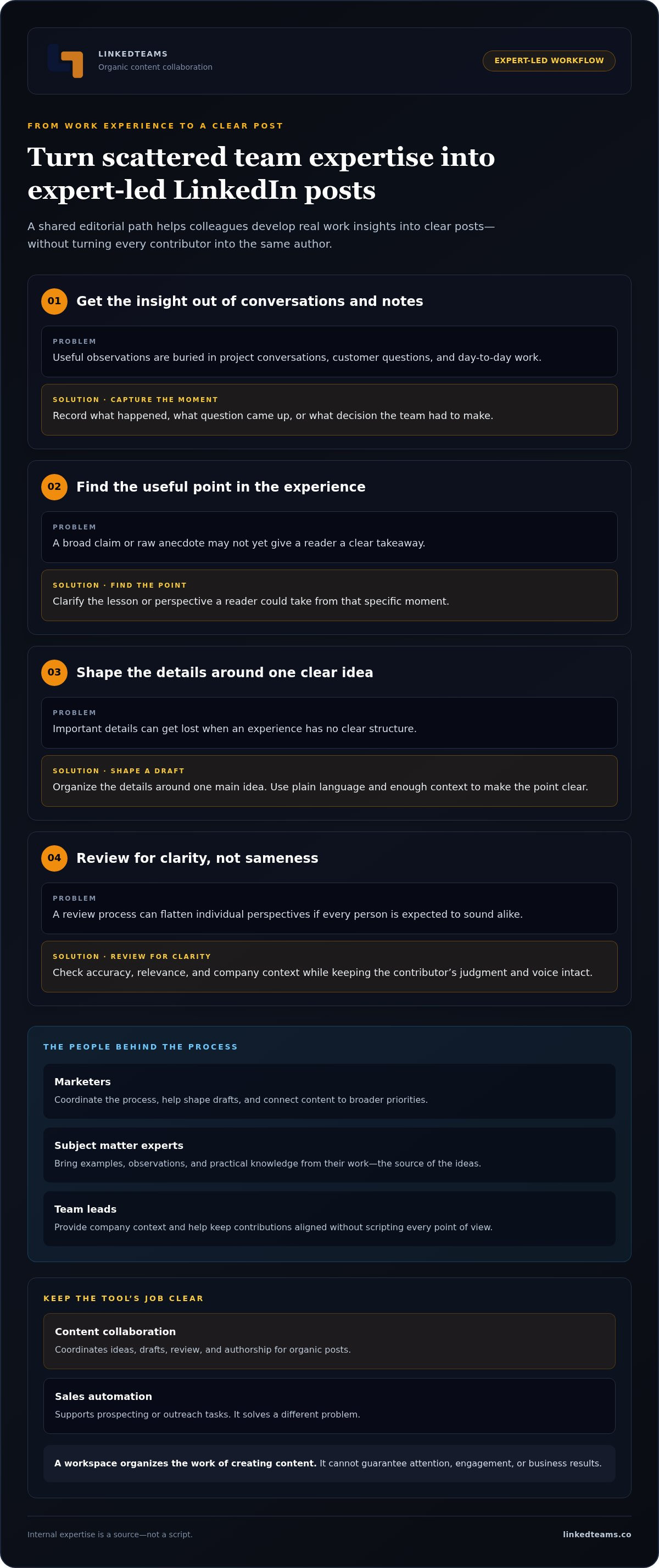
Internal expertise is a source, not a script. It supplies the firsthand detail and professional judgment behind a post. It shouldn't dictate identical wording for every contributor.
Turn real work into useful post material
Start with a specific moment, not a broad claim about being innovative or customer-focused. A team member might describe a question a customer asked, the options considered during a project, or a lesson from a decision that didn't go as planned. Ask for context: What was happening? What did they notice? What would they do differently next time?
An editor can trim digressions, clarify the main point, and make the draft easier to follow. The edit should strengthen the contributor's perspective, not replace it with promotional language or an impersonal company statement. The same specific detail is what keeps AI-assisted drafts from sounding generic.
Align content without flattening individual voices
Shared company context and personal expression serve different purposes. Company context helps contributors understand the audience, subject, and boundaries of a post. Each person's wording, examples, and professional judgment make the contribution their own. Review can check that a post is clear and aligned without requiring everyone to use the same phrases, cadence, or point of view.
This distinction matters for contributors with different writing habits. One person may build a draft from a detailed explanation; another may start with a short observation. B2B LinkedIn content software can give both a structure for developing and reviewing ideas without turning colleagues into a single spokesperson.
LinkedTeams is a collaborative workspace designed to help teams shape organic LinkedIn posts from internal expertise while keeping individual creator voices intact. It supports a self-directed process, with contributors involved in developing their own content rather than handing authorship to a ghostwriter. See how the LinkedTeams workspace works.
B2B LinkedIn content software versus automation and publishing tools
LinkedIn tools can share a platform and still do different jobs. Start with the work your team needs to support: developing employee-authored posts, organizing publication, or running sales outreach. Confusing these tasks can lead to a tool that handles activity but leaves the content process untouched.
Workflow coordination develops posts with people; automated outreach runs prospecting actions at scale. Neither category is universally better. The right fit depends on the bottleneck.
| Tool category | Main task | Where the human contribution sits |
|---|---|---|
| Organic content collaboration | Develop ideas, drafts, and reviews for team content | Contributors bring expertise and shape their own perspectives |
| Publishing and scheduling | Organize when prepared content is published | People prepare and approve content; the tool supports timing |
| Sales outreach automation | Manage prospecting actions such as connection requests or message sequences | People set the outreach approach and handle judgment-sensitive interactions |
Content collaboration software versus LinkedIn automation
Automation tools are designed for sales activity, such as managing connection requests or message sequences. A collaborative content workspace supports a different process: people contribute work knowledge, develop an idea, and review a post before sharing it organically. A campaign sequence and an employee's professional perspective aren't interchangeable. One organizes outreach; the other helps make expertise shareable.
LinkedTeams supports organic content collaboration. It isn't a bot, an automated posting product, or a lead-generation service, and nothing goes out unless a person chooses to publish it. The team remains responsible for its content and decisions. That distinction matters when the goal is to help employees share useful experience, rather than automate contact with prospects. It is also close to the difference between employee advocacy and employee thought leadership.
Content collaboration software versus schedulers
A scheduler helps organize when prepared content is set to publish. It can address a timing or publishing workflow, but scheduling alone doesn't determine where a post's expertise comes from or how colleagues contribute to its development. A team workspace focuses earlier in the process: on contributors, company context, and shaping ideas into content.
Some teams may use different tools for these separate jobs. Others may need to address only one bottleneck. If posts are ready but publication timing is hard to manage, scheduling is the relevant task. If useful ideas stay scattered across colleagues and no one coordinates drafts or reviews, content collaboration is the closer match. Assess B2B LinkedIn content software by the work it helps your team do, not by assuming content tools must automate posting or generate leads.
How to assess whether B2B LinkedIn content software fits your team
Start with the work, not a feature list. A shared content workspace may help if your team has useful expertise but struggles to move ideas through drafting and review. It won't fix a lack of time, interest, or willingness to contribute by itself. The fit depends on whether your team needs a clearer process and is ready to keep employees responsible for their own perspectives.
Identify the bottleneck in your current process
Look for the point where useful expertise gets lost. Is it hard to capture ideas, turn them into drafts, gather feedback, or coordinate contributors? Notice repeated delays and unclear handoffs, without assuming every pause means the team needs to post more often. A workflow problem calls for clearer ownership. A desire for more publishing activity is a different goal.
Map the current process in order. For each stage, name who owns it now, even if the honest answer is "no one." Check whether:
- Someone records useful ideas from customer conversations and project work.
- Contributors know how to share their experience and what context to include.
- A person shapes drafts and gathers feedback without taking over authorship.
- Someone provides company context, such as the audience and subject boundaries.
If work stalls because an idea has no owner or review feedback arrives without a clear next step, coordination may be the issue. If no one is willing to contribute, adding software won't create authentic expertise or commitment.
Set a useful team workflow goal
Choose a goal tied to the friction you found. That might mean clarifying who captures ideas, making it easier for specialists to contribute, or giving drafts a clear review path. Keep the goal practical. "Make expertise easier to share" gives a team something it can shape and assess; "get more attention" depends on audience response the software can't promise.
Then agree on a way to participate that respects different working styles. One colleague may submit a rough draft. Another may prefer to explain an idea for an editor to shape. Neither needs identical posting habits, but each contributor should retain responsibility for their viewpoint and final voice. Without that willingness, the process risks producing content that feels imposed rather than lived.
A useful fit check: Can your team name the content bottleneck, assign owners for ideas, contributors, review, and company context, and support employee-led authorship? If yes, B2B LinkedIn content software may give that process a more organized home. If the need is mainly to schedule prepared posts or automate outreach, a collaboration workspace addresses a different job.
Build an organic B2B LinkedIn content workspace with LinkedTeams
Once a team has identified a coordination gap and is ready to support employee-authored content, a collaborative workspace can give the work a shared home. LinkedTeams is self-directed software for B2B teams creating organic LinkedIn posts from internal expertise. It helps colleagues collaborate on posts and align content with company context while preserving each creator's voice.
The distinction is simple: the workspace supports the process, but employees remain the authors. LinkedTeams isn't done-for-you ghostwriting, automated posting, or a promise of audience growth. Contributors bring the experience and judgment. The team shapes that material into posts it can stand behind.
What LinkedTeams is designed to support
Useful B2B content can draw on the people closest to customer questions, projects, and the decisions behind the work. LinkedTeams provides a collaborative workspace where a team can shape organic posts from that subject matter expertise. The shared process supports company voice alignment, but alignment doesn't mean every colleague must use the same wording or share the same perspective.
That balance matters. A technical specialist may explain a lesson in precise terms, while a customer-facing colleague may frame an idea around a recurring question. Both can contribute within a common company context and still sound like themselves. The software structures collaboration; it doesn't replace employees' expertise with a generic script or an outside writer's voice.
A practical next step for your team
Before introducing a new workspace, choose one content bottleneck to examine. Find the colleagues closest to it, then trace how one useful idea could move from their experience to a finished post. Keep the map grounded in your actual process:
- Contributor insight: Who has firsthand knowledge of the customer question, project, or decision?
- Idea shaping: Who helps clarify the main point without changing its source?
- Review: Who checks accuracy and company context while respecting the author's voice?
- Finished post: Who owns the final wording and decides when it's ready to share?
If the handoffs are unclear, that's a concrete place to improve. If employees aren't willing to contribute or retain ownership of their perspective, software alone won't create authentic content. A good process makes participation clearer; it doesn't manufacture commitment or guarantee reach.
For teams ready to coordinate organic LinkedIn content from internal expertise, LinkedTeams offers a self-directed collaborative workspace that keeps contributors involved as authors. See how publishing works in LinkedTeams, with a person in control of every post.
Make your team's next idea easier to share
Your next step doesn't need to be a sweeping content overhaul. Choose one useful idea from your team's work and map who can bring the experience, shape the draft, and review it. A clear, manageable process gives colleagues room to contribute without turning authentic expertise into scripted company messaging.
That's the purpose of B2B LinkedIn content software built for collaboration. LinkedTeams provides a shared workspace for organic posts drawn from internal expertise. Contributors keep their own voices, and the work stays self-directed, without bots or automated posting.
If your team is ready to give its ideas a clearer path from experience to post, try the free LinkedTeams demo. Start with the people closest to the work. Their perspective is a practical place to begin.
Frequently asked questions
Can B2B LinkedIn content software guarantee reach, engagement, or leads?
No. B2B LinkedIn content software can support collaboration and content preparation, but it can't control how LinkedIn distributes a post or how people respond. Audience response may depend on the topic, its relevance to readers, timing, and the value of the contributor's perspective. Treat software as a way to support the work, not as a promise of pipeline or engagement. Review outcomes across multiple posts rather than judging the process by one result.
How can a team measure whether its LinkedIn content software is useful?
Start by looking at the work itself. Are ideas easier to capture? Do contributors know what's expected of them? Does feedback arrive in a useful form? Then assess whether posts are accurate, relevant, and connected to the person's experience. Audience response can offer context over time, but a change in likes or comments alone can't show that software caused a business result.
What happens if employees do not want to post on LinkedIn?
Don't turn participation into a quota. First, learn what's behind the reluctance. Someone may be unsure what to discuss, short on time, or concerned that a draft won't sound like them. Offer ways to contribute expertise without requiring everyone to publish at the same pace. Make authorship and approval clear, and let people decide whether they're comfortable sharing a post from their own profile. For more on this, see how to get your B2B team to post on LinkedIn without making it another job.
Is LinkedIn content software useful for a small B2B team?
It can be, if valuable ideas are difficult to gather or one person is carrying the whole content process. Team size isn't the deciding factor. Look at the actual friction: perhaps feedback is scattered across messages, or subject matter experts don't know how to contribute. If one person can coordinate the work simply and contributors have a clear path, a dedicated workspace may add little.
How much time does a team need to maintain a LinkedIn content workflow?
There's no fixed time requirement. The effort depends on how often people contribute, how much context a post needs, and how the team handles review. Begin with a manageable pace and a small group, then note where the work takes longer than expected. If review repeatedly stalls, simplify the approval path before increasing the publishing schedule. A sustainable process matters more than an ambitious calendar.
Can employees contribute ideas without publishing from their own LinkedIn profiles?
Yes. Someone can offer an example, explain a technical detail, or help shape a draft without agreeing to publish it personally. Set that expectation before collecting contributions. If a post represents someone's experience, give them a meaningful chance to review how it's presented. A contribution isn't consent to publish from that person's profile, and the final decision about authorship should stay explicit.
What should a team do before introducing content software?
Write down how a post currently moves from an initial idea to a shared draft, review, and publication. Note who handles each handoff and where information gets lost. For instance, if a useful insight is buried in project notes, identify who can bring it forward and who can develop it. This gives the team a clear problem to solve and a practical way to judge whether a workspace helps.